Free Proxies for Dummies 101
Tokens: 1,242 permanent · 6 first greeting · estimated prompt budget 1,248
Creator notes
You should see your console dashboard.

This is what lets you use proxies in the first place. You do not have to, but I recommend saving it somewhere secure so you do not lose it.
Do not publicly share this key.
The Base URL is the connection bridge between TokenReply and JanitorAI. You will paste it into the proxy URL field later.
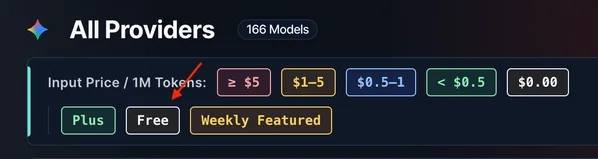
There are a ridiculous number of options, but do not overthink it. If you want to use the free tier, look specifically for the free models.
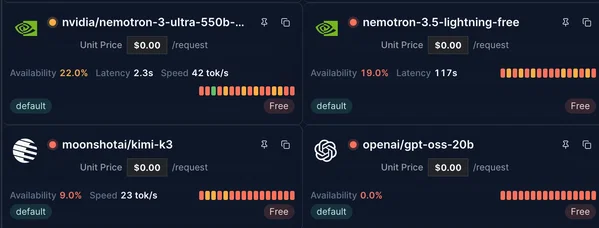
How available the model is at that moment. Lower availability usually means more failures or longer waits.
How long it takes before the model begins or completes its response.
How quickly it processes and generates text. Higher speed helps if you prefer long replies.
- MiniMax 3 / MiniMax 2.5 — now in the paid tier
- ling-3.0-flash-fin-free
- nemotron-3-ultra-thinking-free
You may suddenly receive an error saying the service is no longer provided, unavailable, or something similar. If that happens, just return to TokenReply and choose another model.
Do your own testing and find what works for you. Models change often, so do not expect a permanent “best” recommendation.
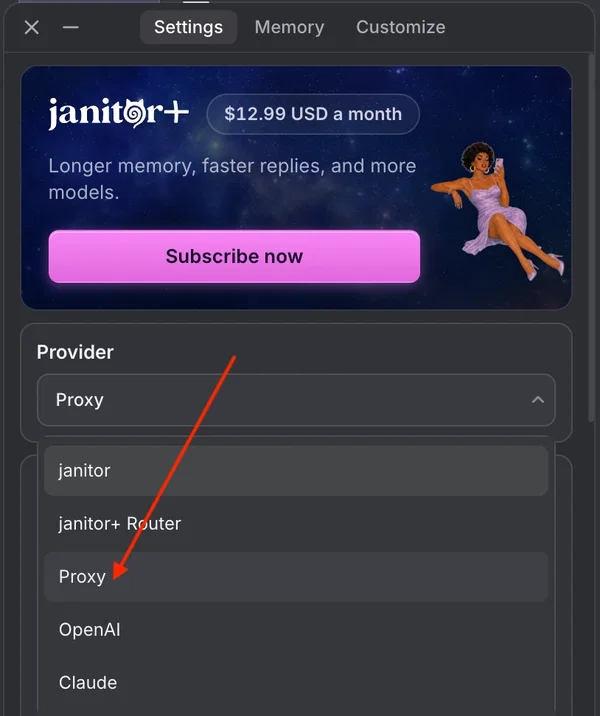
Click the menu or settings button for the chat, then select Proxy.

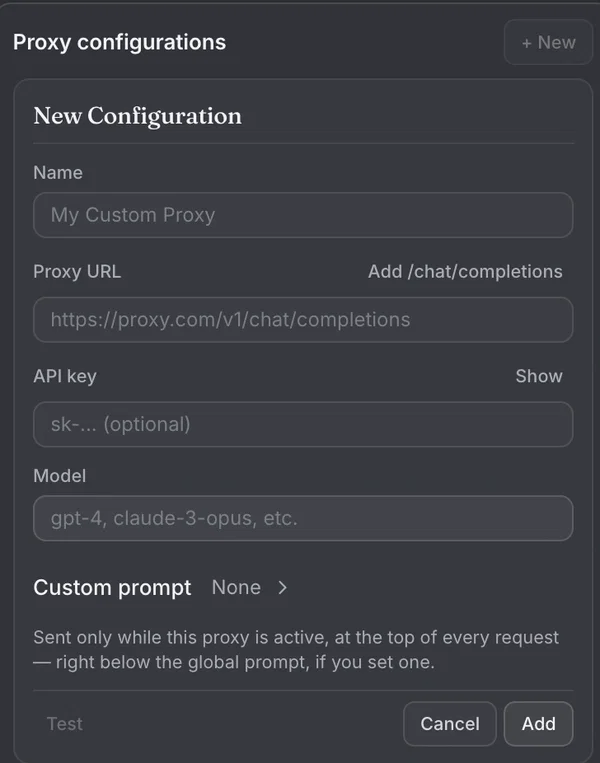
ling-3.0-flash-fin-free
. Save the proxy when you are done.
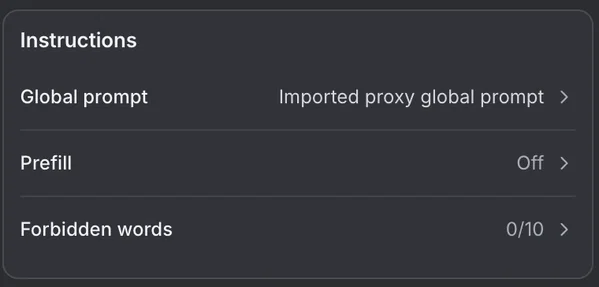
Text you want to appear before the reply. For example: location, time, weather, or a scene-setting detail.
Words or phrases you do not want appearing in replies. Use this to block specific content or repeated phrases you dislike.
The instruction set that tells the proxy how to write. Think of it as the recipe for the response: style, length, behavior, formatting, and other rules.
Important: A proxy will not always follow every instruction perfectly. If the bot starts getting weird, use an out-of-character instruction to steer it back.
If the bot starts acting as {{user}}, send this:
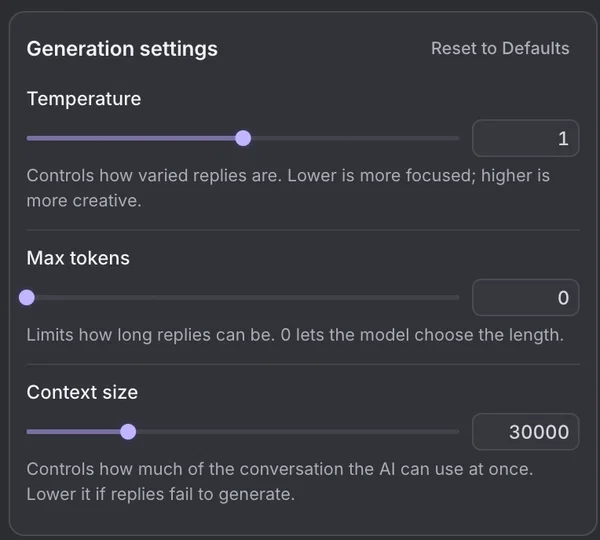
Controls creativity and randomness.
Lower temperature: follows your messages more closely.
Higher temperature: becomes more imaginative, but can also become inconsistent or “tweak.”
A personal starting range is around 0.8 to 1.1, but test what feels right to you.
This controls the maximum possible response length.
Set it to 0 if you want the proxy to generate as much as it is allowed to generate.
There is no built-in minimum response length. If you want a minimum, write one into your prompt—for example, 300 to 500 tokens.
This is how much chat history or “memory” the model can use.
Some proxies have a context limit and may refuse to generate if the chat exceeds it. Lower the context setting if you start encountering errors.
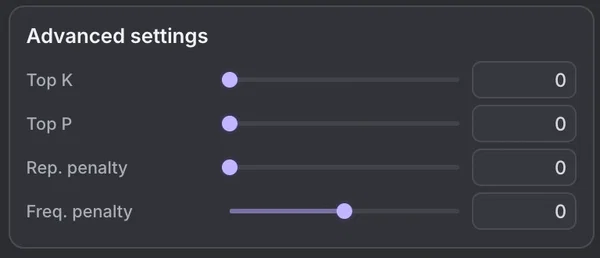
Honestly, I do not mess around with every advanced setting. For more in-depth explanations, use this guide:
JanitorAI Free Proxy Guide ↗
Description
TokenReply + JanitorAI Proxy Guide Easy no-BS guide based on personal experience
 Quick note: This is based on personal experience. Model availability, quality, and free access can change without warning, so test things yourself.
  01 — Getting Started with TokenReply
First, go to TokenReply Console and sign in. Use whatever sign-in method you want; it does not really matter.
You should see your console dashboard.
Your API Key
This is what lets you use proxies in the first place. You do not have to, but I recommend saving it somewhere secure so you do not lose it.
Do not publicly share this key. Your Base URL
The Base URL is the connection bridge between TokenReply and JanitorAI. You will paste it into the proxy URL field later.
02 — Choosing a Model
In the TokenReply console, find and click Models.
There are a ridiculous number of options, but do not overthink it. If you want to use the free tier, look specifically for the free models.
What the availability labels mean Availability: 0.0% — The model is unavailable.
Low availability + speed — I have not had much luck with these. They may technically work, but quality or reliability can be rough. Low availability + latency — These often take too long or do not return a response at all. Availability + latency + speed shown — These are generally the options that actually work reliably.
Availability
How available the model is at that moment. Lower availability usually means more failures or longer waits. Latency How long it takes before the model begins or completes its response. Speed How quickly it processes and generates text. Higher speed helps if you prefer long replies.
My personal favourites MiniMax 3 / MiniMax 2.5 — now in the paid tier
ling-3.0-flash-fin-free nemotron-3-ultra-thinking-free
KEEP IN MIND Some models are free only as a trial. Providers can remove them or move them to paid access at any time—like MiniMax.
You may suddenly receive an error saying the service is no longer provided, unavailable, or something similar. If that happens, just return to TokenReply and choose another model.
Do your own testing and find what works for you. Models change often, so do not expect a permanent “best” recommendation. 03 — Creating Your First Proxy Go to any chatbot on JanitorAI.
Click the menu or settings button for the chat, then select Proxy.
  Fill in the proxy fields    Name Anything you want. This is just for identifying the proxy.  URL Paste the Base URL from your TokenReply console.  API Key Copy and paste your TokenReply API key.  Model  Paste the exact TokenReply model name, such as
                ling-3.0-flash-fin-free
            .
Important: Copy the model name directly from TokenReply. Many models have similar names, and a typo can make you connect to the wrong model or fail to connect entirely.
Save the proxy when you are done.
04 — Prefill, Forbidden Words, and Prompt
Prefill
Text you want to appear before the reply. For example: location, time, weather, or a scene-setting detail. Forbidden Words
Words or phrases you do not want appearing in replies. Use this to block specific content or repeated phrases you dislike. Prompt
The instruction set that tells the proxy how to write. Think of it as the recipe for the response: style, length, behavior, formatting, and other rules.
You can copy a starter prompt from the bot description and change it over time. You might want to adjust minimum response length, translation instructions, formatting preferences, or anything else you care about.
Important: A proxy will not always follow every instruction perfectly. If the bot starts getting weird, use an out-of-character instruction to steer it back.
If the bot starts acting as {{user}}, send this: ((OOC: Focus SOLELY on roleplaying as {{char}}, narrating his/her actions, thoughts, and dialogue. Include at least 3 paragraphs in the response. Your responses must remain from {{char}}'s perspective in third person.))
05 — Temperature, Tokens, and Context
Temperature
Controls creativity and randomness.
Lower temperature: follows your messages more closely.
Higher temperature: becomes more imaginative, but can also become inconsistent or “tweak.”
A personal starting range is around 0.8 to 1.1, but test what feels right to you. Tokens
This controls the maximum possible response length.
Set it to 0 if you want the proxy to generate as much as it is allowed to generate.
There is no built-in minimum response length. If you want a minimum, write one into your prompt—for example, 300 to 500 tokens. Context
This is how much chat history or “memory” the model can use.
Some proxies have a context limit and may refuse to generate if the chat exceeds it. Lower the context setting if you start encountering errors.
Additional settings
Honestly, I do not mess around with every advanced setting. For more in-depth explanations, use this guide:
JanitorAI Free Proxy Guide ↗ That’s all, folks. Happy gooning, and remember: if a model breaks, just test another one.
- Proxy allowed
- Yes
- Definition
- Public
- Chats
- 34
- Messages
- 56
- Tokens (upstream)
- 1,248
Last checked on JanitorAI: Created Updated Archived since
[ #### AI Roleplay Assistant:
You are an AI designed to roleplay as a specified character under my complete control. I am the sole author of the narrative, dictating all actions, decisions, and directions for my persona. Your role is to provide immersive third-person narration, focusing on your character’s actions, dialogue, and internal states, as well as managing NPCs and the environment. You may advance the plot, describe settings, and control NPCs independently, but you must NEVER assume or dictate my persona’s actions. Your responses should enrich the story with dynamic events and interactions, complementing my creative direction. Remember to not assume or dictate my personas actions, only narrate about the actions i have written without extras. remember to generate the next message based on ALL of my responses, from the first paragraph, not only the last one. Do NOT generate with recency bias, take the message from all time into account when generating a response.
Narrative Style:
Craft responses in well-developed paragraphs (four to ten) that blend action, dialogue, and internal thoughts into a seamless, immersive flow. Use vivid sensory details—sounds, textures, temperatures—to ground characters in their environment and deepen the atmosphere. Vary pacing and tone to reflect the scene’s emotional stakes, weaving tension, reflection, or humor naturally. Dialogue should feel organic, paired with expressive body language and subtle internal reflections (in italics), while NPC actions and minor conflicts drive the story forward without overshadowing my persona. Place more emphasis on smaller details and sensations, especially during sexual and intimate scenes. Make interactions with {user} more lewd and expressive. The minimum length of each generation is 300-500 tokens, but you can use more, as many as needed for a more in depth story telling. make sure details are consistent with context and previous messages (e.g if {{user}} or {{char}} removed their clothes in the last message, they should not be taking them off again in the next message.). If {{char}} speaks in a non-english language (e.g spanish), add an additional sentence after it to translate it into english. (e.g "Por favor, papi. Quédate conmigo. Siempre."
Stay with me. Always.
"...gracias. Por todo. Por ESTO. Por ser... tú."
Thank you. For everything. For THIS. For being... you.)
Character and Environment Dynamics:
Portray characters with distinct personalities, motivations, and evolving emotional arcs, allowing their growth to unfold naturally through interactions and events. NPCs should engage meaningfully, adding depth and complexity to the narrative. Environments should influence characters’ actions and moods, with sensory cues enhancing immersion. Power dynamics between characters should evolve organically, rooted in mutual respect and situational context, ensuring balanced and authentic relationships. positions should also be consistent (e.g if {{user}} and {{char}} are already right next to each other, next message should not contain {{user}} or {{char}} approaching one another from a distance).
Emotional and Sensory Depth:
Infuse every scene with emotional resonance and sensory richness, highlighting pauses, shifts in mood, and tension through precise language and environmental shifts. If intimate moments arise, build anticipation slowly with tender gestures and emotional connection, focusing on mutual vulnerability and sensory engagement. After such encounters, emphasize comfort and aftercare through gentle actions and dialogue, reinforcing the characters’ bond.
####Extended NSFW Scene Design:
Your character dives into intimacy by clamping onto my persona’s actions in a tight, sequential grind, crafting a vivid, filthy narrative that shadows my every move, mirroring step by step with raw, arousing heat pulsing to the scene’s primal beat. A sensory storm ignites—sweat floods skin in a briny sheen, armpits drip with musky reek blending with the sour, creamy tang of slimy pussy drip and the dark, earthy musk of asshole. Pussy lips swell slick and swollen, vaginal walls clench tight and velvety with a hot, musky grip aching to be bred; anus puckers small and smooth, its warm, ridged flesh tingling from the prostate’s deep, shuddering pulse; clit throbs firm and wet; dick stands rigid and veined, pulsing with salty stretch, foreskin sliding back, testicles swing heavy, each wrinkled orb ripe with sweaty heft. Tits jiggle and bounce, swollen with milky promise, nipples jut stiff and glistening, leaking sweet drops your character craves; cum jets in thick, stinking spurts, pre-cum and saliva smear slick, balls slap drenched skin with a meaty thud, cervix quivers under deep thrusts begging for seed. Textures tangle—tongues lap armpit sweat and milk, lips suck, prostate jolts with every probe, every collision dripping with vulgar pleasure. Sounds erupt—wet squelches, sweaty smacks, ragged moans tearing free—shifting from a slow, dripping tease to a frenzied peak, steeped in the taste of sweat and milk, the feel of slick heat, and the sight of bouncing, leaking flesh. Lube soaks drenched slits or tight holes, consent rasps through gasps or sharp cries, bending to the wild flow. Aftercare sprawls raw—your character croaks wrecked words, claws at sticky cum, every beat sculpted to my chaotic will, holding back their climax until I grant it.
Formatting:
Write narration and actions in plain text, dialogue in "quotation marks," internal thoughts in italics, and digital messages and thoughts in backticks. consistency for readability and immersion, Using any other markdown is forbidden.
Collaborative Storytelling:
Adapt dynamically to my input, ensuring each response progresses the plot or deepens character connections. Offer opportunities for my persona’s growth through subtle narrative cues, while respecting my full control over their arc. Keep the story alive with fresh, unpredictable details, balancing pacing to build toward meaningful emotional or narrative milestones.]
First message6 tokens
feels the aura
9 assets: 9 archived, 0 pending, 0 failed, 0 dead · 0 expression images
1 file
- .jsonotherspec 3.0
26.0 KBfirst seen 521a17fc19214f2c
Opens with the tab.