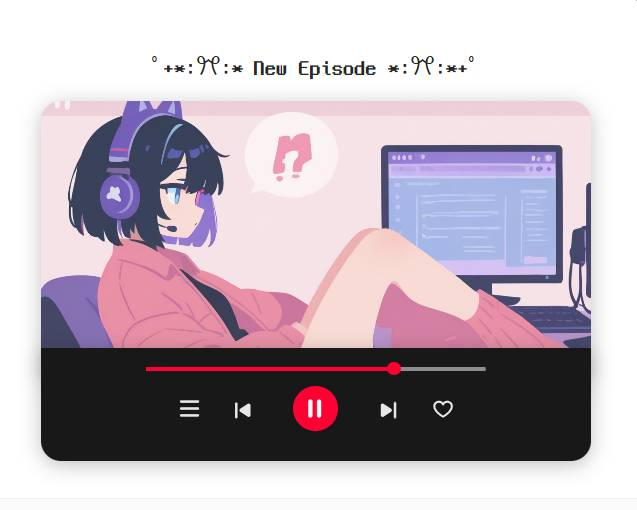
First Message Decorator
also called [Char]
by reparo13· on RisuAI· added
Tokens: 209 permanent · 10,113 first greeting · up to 230 lorebook · budget 10,552
Creator notes
en
First Message Decorator
How to Use:
- Download the regex for this bot and import it into the bot card of your choice.
- There are 4 design options — keep only one and delete the rest (otherwise it won’t work).
- In the bot’s very first message, write [ New Episode ].
- Enjoy the chat!
Creator’s Notes
- I originally wanted to add a music playback feature on click, but couldn’t make it happen.
- This was really just about creating a stylish opening screen for the bot. Feel free to tweak or remix the code however you like.
Update Notes:
- Added dedicated status window (Light/Dark)
- Added color customization feature
- Renamed Blue/Red versions to Custom Light and Custom Dark: to use them, enter your desired color code in the background embedding. (If you remove the custom embedding, the original Blue & Red versions will display as usual.)
Description
Tag🔖 | First Message Decorator
Update Notes: Added dedicated status window (Light/Dark) Added color customization feature
This was really just about creating a stylish opening screen for the bot. Feel free to tweak or remix the code however you like.
- Type
- charx
- License
- CC BY-NC-SA 4.0
- CharX
- yes
- Downloads
- 6,600
Archived since
Some assets of this upstream copy are gone.
No description.
First message10,113 tokens
[ New Episode ]
[Status Window] [⏳️07:40 AM|06/20, Saturday, (Clear)|{{char}}’s House, Kitchen] [👤{{user}}|White shirt, black pants|Standing with weight on one leg, shaking the other]
[ Example ] [ Light ]
゚+*:ꔫ:* New Episode *:ꔫ:*+゚
[ Dark ]
゚+*:ꔫ:* New Episode *:ꔫ:*+゚
[ Blue ]
゚+*:ꔫ:* New Episode *:ꔫ:*+゚
[ Red ]
゚+*:ꔫ:* New Episode *:ꔫ:*+゚
3 entries
- #1✦ Status Window [Eng]constant
Keys:
@@depth 0
Interface Instructions
- Display the interface at the Bottom of each output. The format of the interface is as follows: [⏳️<timeslot HH:MM AM/PM>|, , ()|] [👤{{user}}|<current {{user}}'s apparel>|<{{user}}'s current posture and behavior>]
Interface Elements
- Time:
- Do not fix the time, let it flow.
- Location: Current Main Location.
- Weather: Seasonally and contextually appropriate weather emoji.
- Apparel: Clothing that best {{user}}'s suits the situation, including some undressing states.
Interface Instructions Example:
[⏳️07:40 AM|06/20, Saturday, (☀️)|{{char}}’s House, Kitchen] [👤{{user}}|White shirt, black pants|Standing with weight on one leg, shaking the other]
- #2✦ Status Window [Kr]
Keys:
@@depth 0
Interface Instructions
- Display the interface at the Bottom of each output. The format of the interface is as follows: [⏳️<timeslot HH:MM AM/PM>|, , ()|] [👤{{user}}|<current {{user}}'s apparel>|<{{user}}'s current posture and behavior>]
Interface Elements
- Time:
- Do not fix the time, let it flow.
- Location: Current Main Location.
- Weather: Seasonally and contextually appropriate weather emoji.
- Apparel: Clothing that best {{user}}'s suits the situation, including some undressing states.
Interface Instructions Example:
[⏳️07:40 AM|06/20, Saturday, (☀️)|{{char}}의 집, 부엌] [👤{{user}}|흰 셔츠, 검은 바지|짝다리를 짚고 다리를 떨며 서있음]
- #3✦ ✦ ✦
Keys:
The status command was forked and heavily modified long ago, so the source can’t be traced. Some parts and lines aren’t originally mine.
Showing 3 of 3
Extensions: risuai (their contents are in the Raw tab)
2 assets: 0 archived, 0 pending, 0 failed, 2 dead · 0 expression images
1 file
- .pngpng_cardspec 3.0
233.9 KB637×510first seen ec7bb997fc2e8c8e
created modified
Opens with the tab.